Website AI Crawlers Ke Liye Block Toh Nahi? robots.txt Aur llms.txt Ka 2026 Checklist
NovaEdge Tech Team
Lead Strategist
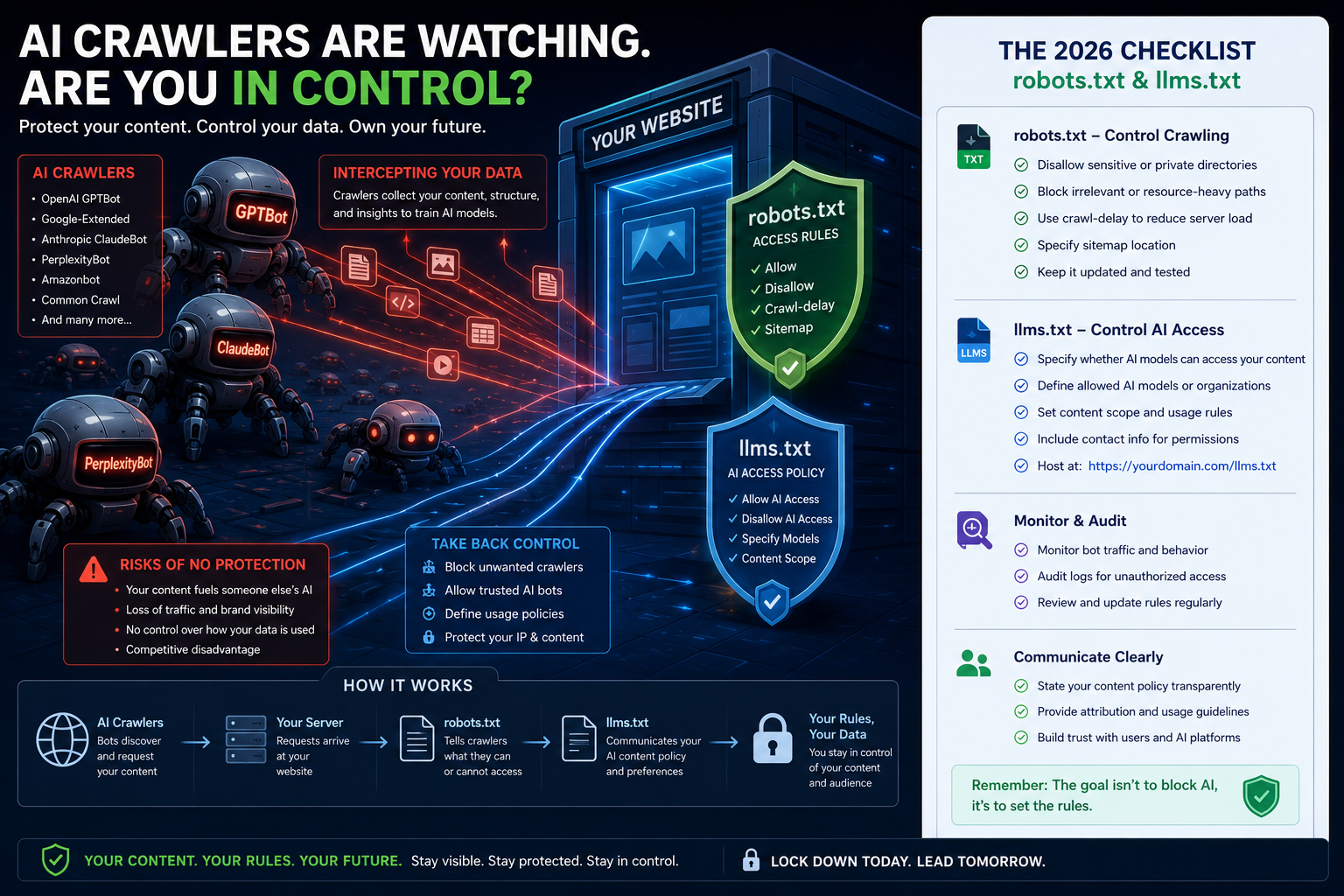
Your website might be invisible to AI search engines, or your content might be training someone else's model without your permission. Here is the 2026 checklist for robots.txt and llms.txt.
Over the last two decades, the relationship between websites and search engines was simple. You put up a website, Google sent a crawler named Googlebot, and in exchange for letting Google scan your files, they sent visitors to your pages. It was an implicit contract: data for traffic.
In 2026, that contract is broken.
Today, your website is crawled by a new class of bots: AI crawlers. These bots do not just index your pages for search; they download your content to train large language models (LLMs) or summarize your pages directly inside conversational interfaces like ChatGPT, Gemini, and Perplexity. When a user asks a question, the AI might answer using your facts, figures, and sentences without ever sending a single user to your site.
This creates a major challenge for business owners and developers. Should you block these crawlers to protect your content, or should you allow them to make sure your business is cited when people search using AI?
To make the right choice, you need to understand two key files at the root of your server: robots.txt and the newly emerged llms.txt standard. This guide is a practical checklist to help you audit, configure, and optimize your website for AI crawlers.
1. The Anatomy of Modern AI Crawlers
Traditional search engine crawlers are designed to discover URLs and build a keyword index. AI crawlers, however, operate in two distinct categories. Understanding this difference is the first step in setting your policy.
Category A: Training Crawlers (Scrapers)
These bots crawl the web to build massive datasets for training future foundation models. They do not run in real-time when a user asks a question. Instead, they ingest data in bulk to update the internal weights of neural networks.
- GPTBot: Used by OpenAI to collect training data for its GPT models.
- ClaudeBot: Used by Anthropic to train Claude.
- Google-Extended: A special directive used by Google. Unlike Googlebot, which crawls for search indexing, Google-Extended allows you to opt out of having your content used to train Google's Gemini models.
- Applebot-Extended: Used by Apple to collect training data for Apple Intelligence features.
- cohere-training-data: Used by Cohere to train enterprise language models.
Category B: Real-Time Browsing & Citation Bots
These bots run dynamically when a user asks a question in an AI search engine. They crawl the web in real-time to find facts, format answers, and provide citations.
- ChatGPT-User: Used when a ChatGPT user explicitly asks the chat interface to browse the web or look up a live URL.
- PerplexityBot: Used by Perplexity to scan the web and assemble real-time answers with citations.
- OAI-SearchBot: Used by OpenAI to power SearchGPT and the search features built directly into ChatGPT.
The Trade-off
If you block Category A (Training Crawlers), you prevent tech companies from using your intellectual property to improve their models for free. If you block Category B (Browsing Bots), you disappear from AI search engines completely. For instance, if a user asks Perplexity, "What is the best custom software agency in Indore?" and your site blocks PerplexityBot, the AI will not be able to read your website, and you will not be included in the answer.
2. Configuring robots.txt for the AI Era
The robots.txt file remains the first line of defense. However, simply using Disallow: / under User-agent: * is a blunt instrument that will drop your website from traditional search results on Google and Bing. Instead, you need a granular approach.
Here are three common configurations depending on your business goals.
Configuration 1: The Open Door (Maximize AI Search Visibility)
If your priority is lead generation and you want your brand to show up as a source in Perplexity, ChatGPT Search, and Gemini, you should allow both search bots and training bots.
User-agent: *
Allow: /
When to use: Early-stage startups, service agencies, or directories that rely on maximum search reach and do not have proprietary data libraries.
Configuration 2: The Guarded Library (Allow AI Search, Block Training)
If you publish original research, tutorials, or articles, you want to be cited in real-time AI searches, but you do not want OpenAI or Google to train their next-generation models on your writing.
# Allow real-time search bots
User-agent: OAI-SearchBot
Allow: /

User-agent: PerplexityBot
Allow: /

# Block AI training bots
User-agent: GPTBot
Disallow: /

User-agent: Google-Extended
Disallow: /

User-agent: ClaudeBot
Disallow: /

User-agent: Applebot-Extended
Disallow: /
When to use: Blogs, news sites, case study databases, and technical documentation hubs.
Configuration 3: The Complete Lockdown (Block All AI Agents)
If you run a SaaS platform with proprietary data, customer dashboards, or paid content, you may want to block all AI agents while keeping standard Google Search active.
User-agent: GPTBot
Disallow: /

User-agent: ChatGPT-User
Disallow: /

User-agent: OAI-SearchBot
Disallow: /

User-agent: ClaudeBot
Disallow: /

User-agent: PerplexityBot
Disallow: /

User-agent: Google-Extended
Disallow: /

User-agent: Applebot-Extended
Disallow: /
When to use: High-value databases, financial platforms, and private directories.
3. The Emergence of the llms.txt Standard
Even if you allow AI crawlers, they often struggle to read modern websites. Standard web pages are built for human eyes. They contain HTML boilerplate, navigation bars, cookie banners, tracking scripts, and visual grids.
When an AI crawler reads a page, it has to parse through thousands of lines of code to find the actual text. This process is slow, wastes bandwidth, and consumes a significant number of tokens (the units of data LLMs use to process text).
To solve this, a new community standard was introduced: /llms.txt.
What is llms.txt?
It is a simple text file located at the root of your domain (e.g., https://novaedgedigitallabs.tech/llms.txt). It provides a clean, markdown-formatted directory of your website's key pages, written specifically for LLMs. By pointing AI crawlers directly to clean text summaries, you reduce their token costs and ensure they understand your services accurately.
The Structure of llms.txt
An llms.txt file consists of:
- Title and Description: A clear heading and a one-sentence summary of your site.
- Core Links: A list of links to important sections of your site, accompanied by short descriptions.
- Optional /llms-full.txt: A secondary file that contains the actual text content of all main pages combined into one document, allowing the LLM to read your entire site in a single request.
Here is a practical example of a /llms.txt file for a digital agency:
# NovaEdge Digital Labs

> Indore-based software development team building custom web systems, mobile applications, and AI integrations.

## Core Resources

- [Services](https://novaedgedigitallabs.tech/services): Details on our custom software engineering, mobile development, and UI/UX design.
- [Case Studies](https://novaedgedigitallabs.tech/projects): Real-world projects we built, including system architecture and performance metrics.
- [Technology Stack](https://novaedgedigitallabs.tech/stack): The frameworks and databases we use (Next.js, Node.js, PostgreSQL).
- [Blog](https://novaedgedigitallabs.tech/blog): Weekly articles on engineering, web performance, and digital tools.
- [Contact](https://novaedgedigitallabs.tech/contact): Form and contact details to start a project with us.
By placing this file at the root of your project, you provide an optimized interface for AI agents. When a crawler scans your root, it detects the file, reads it first, and navigates your site using clean, pre-summarized markdown rather than digging through raw HTML.
4. The 2026 AI Crawler Audit & Configuration Checklist
If you have not updated your website's crawler configurations in the last 12 months, your site is likely operating on default rules. Use this checklist to update your configuration.
| Step | Action | Tools Needed | Expected Outcome |
|---|---|---|---|
| Step 1 | Check server logs for AI User-Agents. | Access Logs, Grep | Identify which bots are scraping your site and how often. |
| Step 2 | Define your crawler policy. | Business Strategy | Decide whether to prioritize AI search visibility or content protection. |
| Step 3 | Update your robots.txt file. | Code Editor | Explicitly set directives for new agents like Google-Extended and GPTBot. |
| Step 4 | Create and upload llms.txt. | Markdown, Text Editor | Provide a clean directory of resources for LLMs. |
| Step 5 | Verify bot accessibility. | Curl, Browser inspect | Ensure that your rules are parsed correctly and paywalled areas remain protected. |
Step 1: Log Audit
Run a query on your web server access logs to search for hits from AI crawlers. For example, if you use Nginx or Apache, search for user agents like "GPTBot" or "PerplexityBot" to see how frequently they access your site. If a bot is hitting your system hundreds of times a minute, it is consuming server resources and you may need to rate-limit it.
Step 2: Policy Alignment
Ask yourself: Is our content our product, or is it our marketing?
- If your content is your product (e.g., a newsletter, a subscription journal, or a database), block training crawlers.
- If your content is your marketing (e.g., case studies, services pages, or public documentation), allow browsing crawlers and make sure you use an llms.txt file to help them parse your information.
Step 3: Implement robots.txt Rules
Create or edit the public/robots.txt file in your project. Ensure the user-agents are declared separately. Do not bundle them all into a single block if you want to apply different rules. For example, if you allow OAI-SearchBot but block GPTBot, they must be written as separate directives.
Step 4: Write Your llms.txt File
Create a new file named llms.txt and place it in your public directory (public/llms.txt in Next.js). Keep the language simple and avoid marketing jargon. Write clear, direct statements about what your business does and what each linked page contains.
Step 5: Test the Configuration
Use a curl command to verify that your server serves the new files correctly and that crawlers receive the correct HTTP status codes.
curl -I https://yourdomain.com/llms.txtVerify that the server returns a 200 OK status and the content-type is text/plain or text/markdown.
Conclusion
Managing how AI crawlers interact with your website is no longer an optional task. As conversational AI search tools replace traditional search queries, maintaining visibility while protecting your proprietary data requires active management. By implementing a clear robots.txt policy and providing structured directory files like llms.txt, you ensure your business remains visible and accurate in the AI search landscape of 2026.
Frequently Asked Questions
About NovaEdge Tech Team
NovaEdge Digital Labs is a team of designers, developers, and strategists dedicated to pushing the boundaries of digital innovation in 2026.
Learn more about the team