How I Automated My LinkedIn Content Strategy using Next.js & RSS

Amit Kumar Raikwar
Lead Strategist
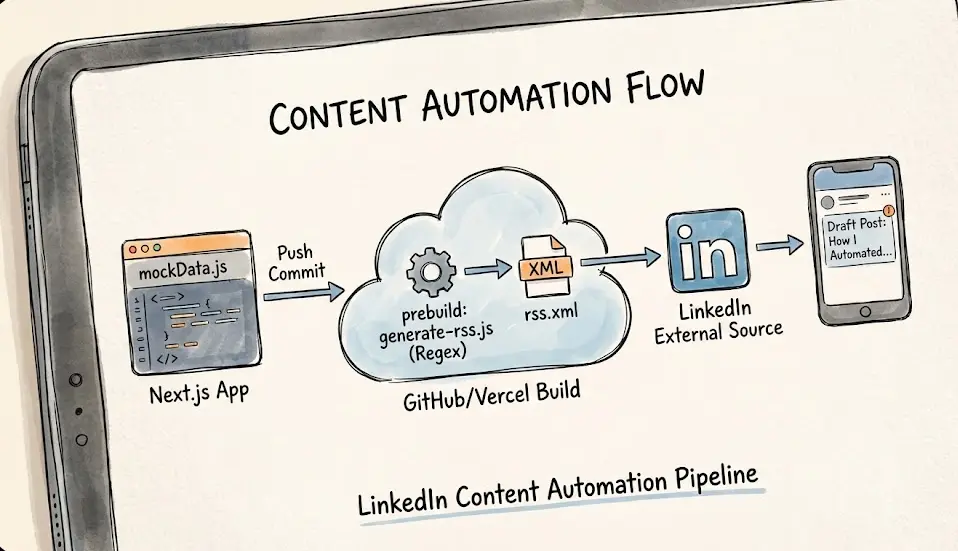
Struggling with manual LinkedIn posting? Learn how to build a fully automated content pipeline using Next.js, RSS feeds, and a creative regex-based data extraction technique to bypass JSX import hurdles and save hours every week.
Let's be honest—manually posting content to LinkedIn is a grind. You write a high-quality blog post, publish it on your Next.js website, and then you have to remember to manually share it. It's repetitive, time-consuming, and frankly, it's a task that begs for automation. As developers, we're taught to 'automate the boring stuff,' yet many of us still handle our social media presence manually.
When I was building the NovaEdge Digital Labs website, I knew I wanted a more elegant solution. I wanted a system where I could simply push code to GitHub, and have my LinkedIn company page automatically updated with a draft of the new content. No manual scheduling, no copy-pasting, just a seamless flow from code to community.
The Goal: A Zero-Touch Content Pipeline
The objective was clear: create an automated pipeline that generates an RSS feed from our Next.js project and connects it to LinkedIn's 'External Content Sources' feature. This would allow LinkedIn to monitor our site for new updates and automatically create post drafts for us to review and publish.
The Tech Stack
- Next.js 16 (App Router): Our core framework for building a high-performance, SEO-friendly website.
- Tailwind CSS: For rapid, responsive UI development.
- Local mockData.js: Our single source of truth for blog posts, projects, and job listings.
- Vercel: For seamless deployment and automatic build triggers.
- Feed NPM Package: A robust library for generating RSS, Atom, and JSON feeds.
The Challenge: Next.js and the JSX Import Hurdle
Building an RSS feed in a static site generator like Next.js isn't as straightforward as it is in WordPress. While WordPress has built-in RSS support, Next.js requires a custom implementation. However, the real challenge wasn't just generating the XML—it was accessing the data.
The 'Node.js vs. JSX' Conflict
Our data was stored in a local mockData.js file. This file was designed for our React components, meaning it imported React and used JSX for things like icons and custom formatting. When I tried to import this file into a standard Node.js script (to generate the RSS feed during the build process), Node.js threw a SyntaxError. It simply couldn't understand the JSX syntax outside of the Next.js build environment.
The 'Aha!' Moment: Regex-Based Data Extraction
I spent hours trying to configure Babel and various transpilers to make the import work, but it felt like over-engineering. Then I had a breakthrough: I didn't need to execute the code in mockData.js; I just needed the data inside it.
Instead of importing the file as a module, I decided to read it as a plain text string using fs.readFileSync. I then used Regular Expressions (Regex) to target the specific exported arrays (blogPosts, jobs, projects) and extract their contents. By using eval() on the matched string, I could convert the text back into a usable JavaScript array without ever triggering the React/JSX imports.
Step-by-Step Implementation
1. The Extraction Script
The script reads the mockData.js file, uses regex to find the array definitions, and parses them into JSON. This approach is incredibly fast and completely bypasses the React complexity.
2. Generating the RSS Feed
Using the feed package, we map our extracted data to the RSS 2.0 standard. We include titles, links, descriptions, and even images to ensure the feed is rich and engaging for LinkedIn's crawlers.
3. Automating with Prebuild
To make this truly 'zero-touch,' I added a prebuild script to our package.json. Now, every time we run npm run build (which happens automatically on every Vercel deployment), the RSS feed is regenerated with the latest content. The rss.xml file is then served from our public directory.
LinkedIn Integration: Connecting the Dots
Once the rss.xml was live, connecting it to LinkedIn was the final piece of the puzzle. By navigating to our LinkedIn Page settings and adding our RSS URL under 'External Content Sources,' we successfully linked our website to our social presence. LinkedIn now checks our feed periodically and creates drafts for us automatically.
The Results: Efficiency at Scale
- Significant Time Savings: We save approximately 2-3 hours every month by eliminating manual cross-posting.
- Improved Consistency: Our LinkedIn page stays active even when we're busy, as every new blog post or job listing is automatically queued.
- Scalability: This system can easily be extended to other platforms like Twitter or Medium that support RSS ingestion.
- Single Source of Truth: We only ever update
mockData.js, and the changes propagate everywhere automatically.
Conclusion: Work Smarter, Not Harder
Automation isn't just about saving time; it's about reducing the cognitive load of repetitive tasks. By building this simple RSS pipeline, we've ensured that our content reaches our audience without any extra effort on our part. If you're building with Next.js, I highly recommend implementing a similar system to streamline your content strategy.
Ready to automate your own content? Start by looking at your manual workflows and asking: 'How can I make this a script?' The results will surprise you.
Frequently Asked Questions
About Amit Kumar Raikwar
NovaEdge Digital Labs is a team of designers, developers, and strategists dedicated to pushing the boundaries of digital innovation in 2026.
Learn more about the team