On-Page SEO Checklist for Every New Website
NovaEdge Digital Labs
Lead Strategist
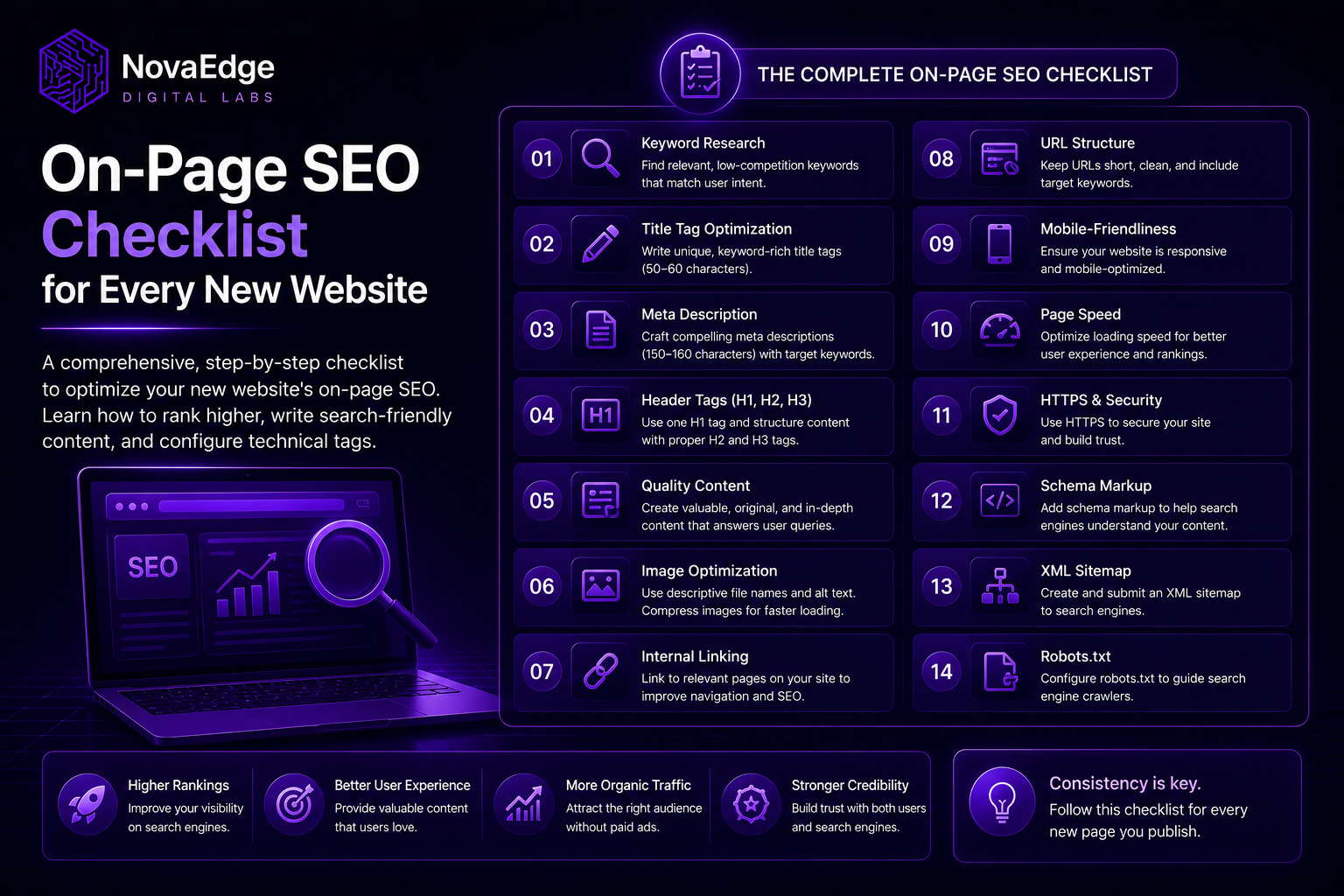
A comprehensive, step-by-step checklist to optimize your new website's on-page SEO. Learn how to rank higher, write search-friendly content, and configure technical tags.
Building a new website is a major milestone. You spend weeks designing layouts, writing copy, and adjusting elements to make everything look perfect. Finally, you click publish. But then, days pass, and the traffic counter remains at zero. The reality of the internet is simple: a beautiful website that search engines cannot find is virtually invisible.
To connect with visitors, you need search engine optimization. Specifically, you need to start with on-page SEO.
Here is a clear definition of what this entails: On-page SEO is the practice of optimizing individual web page elements—including both visible copy and hidden HTML source code—to make them more understandable and relevant to search engines.
When done correctly, it helps search engines like Google match your content with the queries people type into search bars. This article provides a comprehensive, practical guide to structuring and optimizing your website to capture that search traffic.
On-Page SEO vs Off-Page SEO: The Core Differences
Understanding the difference between the two main pillars of SEO is important before diving into optimization. The table below outlines how they differ in scope and implementation.
1. Start with the Core: Keywords and Intent
Before writing copy or code, you must know what terms your prospective audience uses. This process is keyword research, which forms the foundation of all on-page SEO.
Identify one primary keyword for every page on your site as the core topic. For example, if you build a landing page for a Boston plumbing business, your primary keyword might be "emergency plumber Boston".
Select three to five secondary keywords. These are closely related variations or subtopics that help search engines understand the broader context. For example, secondary keywords might include "leak repair Boston", "drain cleaning services", or "local plumber cost".
Understand search intent—the motivation behind a query. Google prioritizes pages that satisfy this intent:
If your page targets "emergency plumber Boston" (transactional) but provides a history of plumbing (informational), searchers will leave immediately, harming your rankings.
2. Structure with HTML Headings
HTML headings (H1, H2, H3, and H4 tags) create an outline of your page's content, helping both human readers and search crawlers navigate your ideas logically.
The Single H1 Rule: Your page title must be wrapped in an <h1> tag. There should be exactly one <h1> tag per page. Multiple H1 tags confuse search crawlers about the page's primary focus.
Use Headings to Build Hierarchy: Think of your page as a book chapter. The title is the H1. The main sections are H2s. Subsections within those sections are H3s, and further subdivisions are H4s.
Integrate Keywords Naturally: Place your primary keyword in the H1 tag, preferably near the beginning. Use secondary keywords in your H2 and H3 tags where they fit naturally. Do not force them or engage in "keyword stuffing". If a heading sounds awkward when read aloud, rewrite it.
3. Title Tags and Meta Descriptions
Title tags and meta descriptions are the first interaction a user has with your website on search engine result pages. They act as your website's organic advertisement copy.
Write Compelling Title Tags: The title tag is a critical ranking factor. According to a search study published by Backlinko in 2023, pages with a target keyword in their title tag have a significantly higher organic click-through rate than those without.
Craft Engaging Meta Descriptions: While meta descriptions do not directly affect rankings, they directly influence click-through rates.
4. URL Architecture and Internal Linking
A clean URL structure improves both user experience and crawlability. Search engines use URLs to understand the relationship between different pages.
Keep URLs Simple and Descriptive:
Build a Strong Internal Linking System: Internal links connect your pages, distribute ranking power, and guide visitors.
5. Optimize Images for Speed and Accessibility
Images make websites visually engaging, but unoptimized files are the primary cause of slow load times. Slow websites frustrate users and face ranking penalties.
Compress and Resize Before Uploading: Resize the dimensions to the maximum width they will display on screens, and compress them using tools like TinyPNG.
Use Modern Formats: Prefer modern formats like WebP or AVIF over traditional JPEG and PNG files. They offer superior quality at a fraction of the file size. If you use a framework like Next.js, leverage the built-in next/image component to handle compression, resizing, and lazy loading automatically.
Write Descriptive ALT Text: Alternative text (ALT text) makes your site accessible to visually impaired users and helps search engines understand the image.
6. Content Quality and the E-E-A-T Framework
Google uses the E-E-A-T framework—Experience, Expertise, Authoritativeness, and Trustworthiness—to evaluate content quality.
Write for Humans First: Do not write articles solely to satisfy search engine algorithms. Write to solve a user's problem, answer their question, or simplify a complex topic. If your text is filled with repeated keywords and offers no practical insights, visitors will bounce.
Focus on Depth and Comprehensiveness: While word count is not a direct ranking factor, in-depth articles tend to rank better because they cover topics thoroughly. Write comprehensive articles that cover a subject from all angles.
Build Trust with Facts and Citations: Support your claims with data, statistics, and references to authoritative sources. For instance, if you state that mobile search accounts for over half of global web traffic, link to a reputable source like Statista. When citing studies, include the year to prove the information is current.
Structure for Readability: Break up large blocks of text. Use short paragraphs, bulleted lists, bold text for key points, and clear subheadings to make scanning easy.
7. Technical On-Page Elements
Technical on-page SEO ensures that search engines can access, crawl, and render your pages without errors.
Implement Canonical Tags: A canonical tag (rel="canonical") tells search engines which version of a URL is the master copy, preventing duplicate content issues.
Add Structured Data (Schema Markup): Schema markup is code added to help search engines understand content. Implementing schema (such as LocalBusiness or Article) enables rich snippets like review stars. Use JSON-LD format.
Prioritize Mobile Responsiveness: A Google Search Central document updated in 2024 states that mobile-first indexing is the standard for all new websites. Ensure your website layout adjusts seamlessly to all screen sizes.
Improve Core Web Vitals: Core Web Vitals measure real-world user experience:
Conclusion and Action Plan
On-page SEO is a continuous process of auditing, updating, and refining your pages to adapt to changing search algorithms and user behaviors. By implementing this checklist systematically across every page of your new website, you establish a solid foundation that allows search engines to discover and index your content correctly.
If you focus on creating fast, accessible, and informative pages that put the user experience first, your search rankings will follow.
At NovaEdge Digital Labs, we help businesses build fast, responsive, and SEO-optimized web applications that rank well and convert visitors into customers. If you are launching a new site or looking to improve your existing organic traffic, reach out to us to build your digital presence.
Frequently Asked Questions
About NovaEdge Digital Labs
NovaEdge Digital Labs is a team of designers, developers, and strategists dedicated to pushing the boundaries of digital innovation in 2026.
Learn more about the team